Note:
This topic has been translated from a Chinese forum by GPT and might contain errors.
Original topic: dm执行报错 :invalid connection
[TiDB Usage Environment] Production Environment / Testing / Poc
[TiDB Version]
[Reproduction Path] What operations were performed when the issue occurred
[Encountered Issue: Issue Phenomenon and Impact]
[Resource Configuration]
[Attachments: Screenshots / Logs / Monitoring]
Execution Error:
{
“ErrCode”: 32001,
“ErrClass”: “dump-unit”,
“ErrScope”: “internal”,
“ErrLevel”: “high”,
“Message”: "mydumper/dumpling runs with error, with output (may empty): ",
“RawCause”: “sql: SELECT COLUMN_NAME,EXTRA FROM INFORMATION_SCHEMA.COLUMNS WHERE TABLE_SCHEMA=? AND TABLE_NAME=? ORDER BY ORDINAL_POSITION;: invalid connection”,
“Workaround”: “”
}
],
The backend logs are also like this
The connection between the frontend and backend is normal. I can see the SQL statements executed by the frontend and the connections of the backend users.
Occasionally, the following error occurs
Restarted the task, but it didn’t work.
Does it report immediately after the task is created?
The front end of MySQL can clearly see the SQL for data extraction, and the back end of TiDB can also see the DM user connection. It doesn’t seem to be a connection issue.
You can try the following steps:
- Ensure the TiDB database connection information is correct: Check your connection configuration, including hostname, port number, username, and password, to ensure it matches the TiDB database connection information.
- Check the network connection: Ensure your network connection is normal. You can try using other tools (such as MySQL client) to connect to the TiDB database to verify if the connection is normal.
- Check the status of the TiDB database: Ensure the TiDB database is running normally and there are no other anomalies or errors. You can check the database status through TiDB’s monitoring tools or logs.
- Check permissions: Ensure the database account you are using has sufficient permissions to execute mydumper or dumpling operations. You can try using an account with higher permissions or contact the database administrator for permission settings.
Test the SQL that is causing the error.
We have no issues running a single table, so it doesn’t seem like a connection problem. The keyword causing the error has been commented out, so we can’t see the specific SQL.
context canceled
github.com/pingcap/errors.AddStack
/go/pkg/mod/github.com/pingcap/errors@v0.11.5-0.20201126102027-b0a155152ca3/errors.go:174
github.com/pingcap/errors.Trace
/go/pkg/mod/github.com/pingcap/errors@v0.11.5-0.20201126102027-b0a155152ca3/juju_adaptor.go:15
github.com/pingcap/dumpling/v4/export.decodeFromRows
/go/pkg/mod/github.com/pingcap/dumpling@v0.0.0-20210407092432-e1cfe4ce0a53/v4/export/ir.go:68
github.com/pingcap/dumpling/v4/export.(*rowIter).Decode
/go/pkg/mod/github.com/pingcap/dumpling@v0.0.0-20210407092432-e1cfe4ce0a53/v4/export/ir_impl.go:39
github.com/pingcap/dumpling/v4/export.WriteInsert
/go/pkg/mod/github.com/pingcap/dumpling@v0.0.0-20210407092432-e1cfe4ce0a53/v4/export/writer_util.go:198
github.com/pingcap/dumpling/v4/export.FileFormat.WriteInsert
/go/pkg/mod/github.com/pingcap/dumpling@v0.0.0-20210407092432-e1cfe4ce0a53/v4/export/writer_util.go:600
github.com/pingcap/dumpling/v4/export.(*Writer).tryToWriteTableData
/go/pkg/mod/github.com/pingcap/dumpling@v0.0.0-20210407092432-e1cfe4ce0a53/v4/export/writer.go:204
github.com/pingcap/dumpling/v4/export.(*Writer).WriteTableData.func1
/go/pkg/mod/github.com/pingcap/dumpling@v0.0.0-20210407092432-e1cfe4ce0a53/v4/export/writer.go:189
github.com/pingcap/br/pkg/utils.WithRetry
/go/pkg/mod/github.com/pingcap/br@v5.0.0-nightly.0.20210329063924-86407e1a7324+incompatible/pkg/utils/retry.go:35
github.com/pingcap/dumpling/v4/export.(*Writer).WriteTableData
/go/pkg/mod/github.com/pingcap/dumpling@v0.0.0-20210407092432-e1cfe4ce0a53/v4/export/writer.go:160
github.com/pingcap/dumpling/v4/export.(*Writer).handleTask
/go/pkg/mod/github.com/pingcap/dumpling@v0.0.0-20210407092432-e1cfe4ce0a53/v4/export/writer.go:103
github.com/pingcap/dumpling/v4/export.(*Writer).run
/go/pkg/mod/github.com/pingcap/dumpling@v0.0.0-20210407092432-e1cfe4ce0a53/v4/export/writer.go:85
github.com/pingcap/dumpling/v4/export.(*Dumper).startWriters.func4
/go/pkg/mod/github.com/pingcap/dumpling@v0.0.0-20210407092432-e1cfe4ce0a53/v4/export/dump.go:272
golang.org/x/sync/errgroup.(*Group).Go.func1
/go/pkg/mod/golang.org/x/sync@v0.0.0-20201020160332-67f06af15bc9/errgroup/errgroup.go:57
runtime.goexit
/usr/local/go/src/runtime/asm_amd64.s:1357
This error usually occurs when the upstream MySQL cannot be connected. From the machine where the dm_worker is located, try connecting to the upstream MySQL based on your source configuration.
It can be connected. I can see the dumped SQL statements and the connection threads of the backend TiDB.
Is the target database load and the DM machine load high? You can do a long ping with a large packet and also observe the network.
Target? This is the dump stage, it doesn’t seem to reach the target step yet.
Dumping two of the tables is not a problem, the backend TiDB is empty with no data.
Based on my practice, it should be that there is too much data in the upstream table. Try increasing the max-allowed-packet parameter. If that doesn’t work, you can split the synchronized database into multiple tasks.
Increase max-allowed-packet
Check connection-related parameters, including the number of connections, allowed packet size, connection time, etc.
I can’t view images directly. Please provide the text you need translated.
I have already tried adjusting these things before, but it didn’t have much effect.
Set it to 1G, but it still doesn’t work.
The trouble is that this is continuously synchronized. There might be table creation operations later on. If you filter by table, the table creation DDL might not be synchronized.
 |
username: 大钢镚13146
|
username: 大钢镚13146



 |
username:
|
username:  |
username:
|
username: 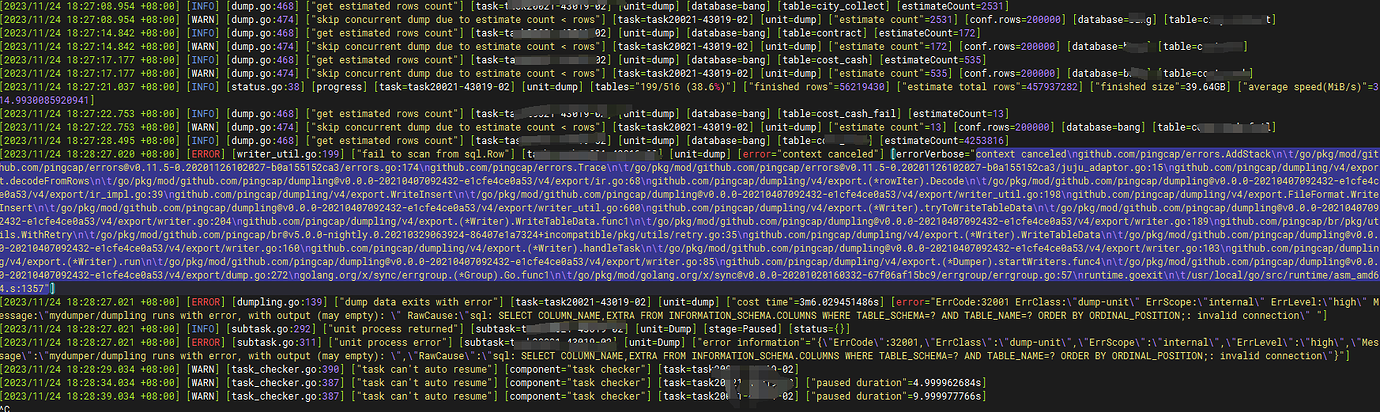
 |
username:
|
username:  |
username:
|
username:  |
username:
|
username:  |
username:
|
username:  |
username:
|
username:  |
username:
|
username: