Note:
This topic has been translated from a Chinese forum by GPT and might contain errors.
Original topic: tidb加索引卡死,进程一直running,无法杀死进程
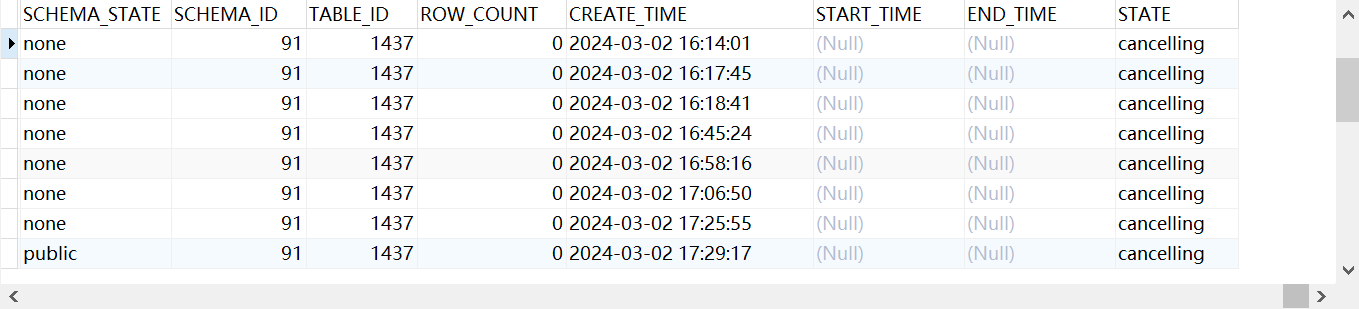
When performing a create index operation on TiDB, the process got stuck. After manually closing the window, the process remained in the background. Then, using the command admin cancel ddl jobs 20038;, it showed that the process was in the “cancelling” state. However, when performing DDL operations on the database, all operations got stuck. Research indicated that this was because the process was still in the cancelling state, causing subsequent DDL operations to queue up. How can I completely kill this process?
Have you tried using SHOW PROCESSLIST and then KILL id?
There are unfinished DDL tasks before this, so the canceled DDLs are also in the queue. Just restart all TiDB server components.
This should be a large transaction, you can only wait.
I’ve tried, but I can’t kill it.
It has been running for several days and cannot be stopped.
How exactly do I operate it, please?
You should try restarting all TiDB server nodes…
How much data is there? If the data volume is too large, could it be that the rollback time is also very long when a cancel occurs?
With just over 5,000 rows in the table, adding an index causes it to crash.
tiup can specify restarting a component node: tiup cluster restart {cluster-name} -N {tidb-ip:port}
Is that correct?
Is XXX -R the name? Should tidb-test be written directly after it?
-N is for node, -R is for role. You can refer to it.
First, check the table mysql.tidb_mdl_view to see if there are any blocking records.
xxx is the cluster name. -R is followed by roles such as tidb, tikv, pd, etc.
What should be added after -R? Is tidb enough?
Just add TiDB, the database access will be interrupted during the restart, find a time to run it yourself.
tiup cluster restart tidb-zhao -R tidb
 |
username: TiDBer_8xw9Q7ml
|
username: TiDBer_8xw9Q7ml
 |
username:
|
username:  |
username:
|
username:  |
username:
|
username:  |
username:
|
username:  |
username:
|
username:  |
username:
|
username:  |
username:
|
username: